Screenshot Equivalence Workflow
This page describes how to validate that an LLM-generated SolidWorks model is geometrically equivalent to a reference model using automated screenshot comparison.
Concept
The done criterion for every model recreation task is:
"Take a screenshot of the already-made sample and the LLM-generated one — they must be the same."
We implement this as a pixel-diff pipeline:
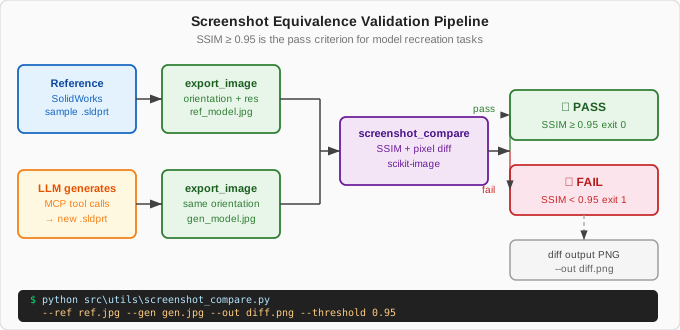
- Export reference image from the shipped sample part (
export_image) - Generate the part via MCP tools
- Export image at the same orientation and resolution
- Compute structural similarity (SSIM) and pixel-difference score
- Pass if SSIM ≥ 0.95 and mean pixel diff ≤ 5%
Prerequisites
Install the comparison utilities:
Or using the project environment:
screenshot_compare.py
The utility lives at src/utils/screenshot_compare.py. Run it from the project root:
.venv\Scripts\python.exe src\utils\screenshot_compare.py `
    --ref  "C:\Temp\ref_baseball_bat.jpg"  `
    --gen  "C:\Temp\gen_baseball_bat.jpg"  `
    --out  "C:\Temp\diff_baseball_bat.png" `
    --threshold 0.95
Exit codes:
0— SSIM ≥ threshold (PASS)1— SSIM < threshold (FAIL)2— Image load error
Step-by-step Validation
1. Capture reference image
# Via MCP tool call
open_model(file_path=r"C:\Users\Public\Documents\SOLIDWORKS\SOLIDWORKS 2026\samples\learn\Baseball Bat\Baseball Bat.SLDPRT")
export_image(file_path=r"C:\Temp\ref_baseball_bat.jpg", format_type="jpg")
close_model(save=False)
2. Create the recreation
Run your LLM prompt from Recipe 3 — Baseball Bat.
3. Capture generation image
# The part is still open after creation
export_image(file_path=r"C:\Temp\gen_baseball_bat.jpg", format_type="jpg")
4. Run comparison
.venv\Scripts\python.exe src\utils\screenshot_compare.py `
    --ref "C:\Temp\ref_baseball_bat.jpg" `
    --gen "C:\Temp\gen_baseball_bat.jpg" `
    --out "C:\Temp\diff_baseball_bat.png"
5. Interpret results
SSIM score:   0.97   ✅ PASS (threshold: 0.95)
Mean px diff: 3.2%   ✅ PASS (threshold: 5.0%)
Max px diff:  28.1%  (hot pixels from lighting — normal)
Diff image:   C:\Temp\diff_baseball_bat.png
Comparison Algorithm
The screenshot_compare.py script uses two metrics:
SSIM (Structural Similarity Index)
A score of 1.0 is pixel-perfect. Scores above 0.95 indicate functionally equivalent geometry with minor rendering differences (anti-aliasing, lighting angle).
Mean Pixel Difference
Normalised to 0–100%. Below 5% is the target for shape equivalence.
Batch Validation
To validate all sample recreations in one pass:
.venv\Scripts\python.exe src\utils\screenshot_compare.py --batch `
    --manifest "tests/.generated/screenshot_manifest.json" `
    --report   "tests/.generated/screenshot_report.json"
The manifest format:
[
  {
    "name": "Baseball Bat",
    "ref":  "C:\\Temp\\screenshots\\ref_baseball_bat.jpg",
    "gen":  "C:\\Temp\\screenshots\\gen_baseball_bat.jpg",
    "diff": "C:\\Temp\\screenshots\\diff_baseball_bat.png"
  }
]
Known Limitations
| Issue | Cause | Workaround |
|---|---|---|
| Identical SSIM but wrong scale | Model is correct shape but wrong size | Compare mass properties as secondary check |
| SSIM fails due to view angle | SolidWorks randomises default view | Export both with view_orientation="isometric" param (when supported) |
| Dark vs light background | Export settings differ | Set display background to white in both exports |
| Anti-aliasing noise | High-frequency edges differ by 1-2 px | Use Gaussian blur pre-processing (built into the script) |
| Mirror image | Part assembled with wrong chirality | Rotate reference 180° and re-compare |
Integration with Test Harness
The TestLevelCRealCOM class in tests/test_all_endpoints_harness.py includes test_c06_export_image which exports a JPEG after every modelling lifecycle test. Connect this to screenshot comparison by adding to your CI script:
# After Level C tests produce smoke_c06_image.jpg
.venv\Scripts\python.exe src\utils\screenshot_compare.py `
    --ref "docs\reference-screenshots\ref_smoke_extrude.jpg" `
    --gen "C:\Temp\mcp_smoke_integration\smoke_c06_image.jpg"
Commit golden reference images to docs/reference-screenshots/ when you are satisfied with the output.