Prompting Best Practices for SolidWorks MCP
This guide is designed for mechanical engineers and CAD users who are new to MCP tool calling.
Why Prompting Style Matters
SolidWorks automation is deterministic when model state is deterministic.
Most failures are caused by:
- Ambiguous dimensions or units.
- Missing file paths.
- Wrong active document.
- Human UI interaction while the LLM is executing a tool chain.
Golden Prompt Format
Every reliable prompt has four required sections. Miss any one and you risk silent failures or hallucinated dimensions:
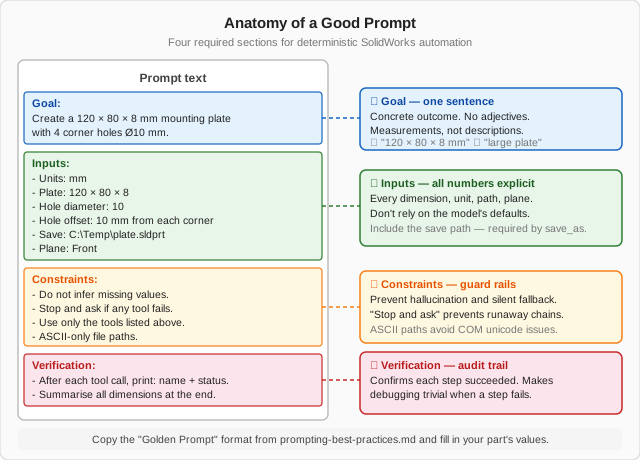
Use this exact structure for repeatable results:
Goal:
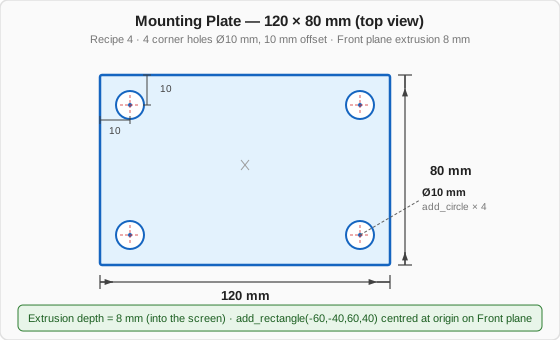
Create a 120 x 80 x 8 mm mounting plate with 4 holes.

Inputs:
- Units: mm
- Plate length: 120
- Plate width: 80
- Plate thickness: 8
- Hole diameter: 10
- Hole offsets: 10 mm from each corner
- Save path: C:\\Temp\\mcp_demo\\mounting_plate.sldprt

Constraints:
- Use Front Plane.
- Stop if any tool call fails.
- Do not invent values.

Verification:
- After each tool call, print: tool name, status, key output.
- At the end, summarize final dimensions and output file paths.
The part this prompt describes looks like this (top view):
UI Interaction Rules
When SolidWorks is open during MCP execution:
- Start with a clean session (close unrelated docs).
- Do not click in the graphics area while a multi-step chain is running.
- Keep planes visible: Front Plane, Top Plane, Right Plane.
- Use short, ASCII-only file names and absolute paths.
- Keep one active target model per prompt.
Best Prompt Patterns
1. Single-Step Deterministic Prompt
2. Guarded Multi-Step Prompt
Run these steps in order and stop on first failure:
1) Create a new part named MCP_Demo_Part.
2) Create sketch on Front Plane.
3) Add circle center (0,0) radius 20 mm.
4) Exit sketch.
5) Save as C:\\Temp\\mcp_demo\\mcp_demo_part.sldprt.
After each step, report tool name + status.
3. Retry-once Recovery Prompt
If any step fails:
1) Show exact failing tool and error.
2) Propose one minimal retry.
3) Execute only that retry.
4) Stop if retry fails.
4. Validation Prompt
Open C:\\Temp\\mcp_demo\\mcp_demo_part.sldprt and confirm:
- active document name
- document type
- path
Return results in JSON.
Prompt Anti-Patterns
Avoid these if you want predictable behavior:
- "Make something similar to this" without exact dimensions.
- Mixed units in one prompt.
- Relative paths for save/export.
- Long unstructured paragraphs with hidden requirements.
Recommended Live Demo Sequence
Use this sequence for first-time users:
- Connection health check.
- Create and save a part.
- Reopen the part.
- Create and save an assembly.
- Close documents.
- Clean generated files.
Prompting Checklist
Use this checklist before pressing Enter:
- Goal is one sentence.
- Dimensions and units are explicit.
- Save/export paths are absolute.
- Stop-on-failure behavior is requested.
- Verification output format is requested.