Tool Catalog — All 132 Tools
This reference documents all 132 MCP tools registered by the SolidWorks MCP server. Each section covers one functional category with parameter tables and copy-paste sample calls.
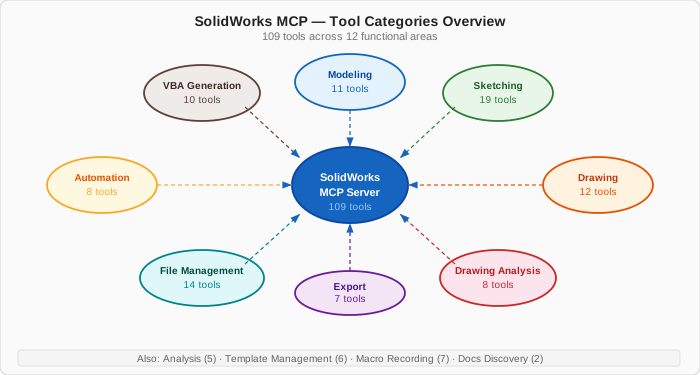
Quick Navigation
| Category | Count | Description |
|---|---|---|
| Modeling Tools | 12 | Create and manipulate SolidWorks parts, assemblies, and drawings — sketches, extrusions, revolves, dimensions, feature renaming, and the document unit system. |
| Sketching Tools | 19 | Build 2-D sketch geometry (lines, circles, arcs, splines, polygons) and apply geometric constraints and dimensions. |
| Drawing Tools | 13 | Create and edit 2-D technical drawings: add projected, section, and detail views, place annotations, and auto-dimension layouts. |
| Drawing Analysis Tools | 8 | Quality-gate your drawings by analyzing dimensions, annotations, view coverage, standards compliance, and completeness. |
| Analysis Tools | 5 | Extract engineering properties from models, including mass, volume, center of mass, inertia, and material metadata. |
| Export Tools | 7 | Convert SolidWorks models to industry-standard interchange and manufacturing formats such as STEP, IGES, STL, DWG, PDF, and images. |
| File Management Tools | 18 | Open, save, and manage SolidWorks documents; load parts and assemblies, switch the active document, enumerate what's open, inspect model metadata, and classify model families. |
| Automation Tools | 8 | Orchestrate multi-step workflows, run batch file processing, manage design tables, and tune performance settings. |
| VBA Generation Tools | 10 | Generate and execute VBA macro code for operations that exceed direct COM call complexity or require procedural automation. |
| Template Management Tools | 6 | Create, extract, apply, compare, and manage SolidWorks document templates in a reusable library workflow. |
| Macro Recording Tools | 7 | Record, replay, analyze, and optimize SolidWorks VBA macros, including macro libraries and batch execution workflows. |
| Docs Discovery Tools | 2 | Introspect the live SolidWorks COM object library to discover available interfaces, methods, and practical API usage guidance. |
Standard Response Envelope
Every tool returns a dictionary with at least:
{
  "status": "success" | "error",
  "message": "Human-readable description",
  "data": { ... },
  "execution_time": 0.123
}
On error, data is omitted and message contains the failure reason.
Request → Response Flow
sequenceDiagram
    participant LLM
    participant MCP as MCP Server
    participant COM as SolidWorks COM
    participant SW as SolidWorks

    LLM->>MCP: tool call + JSON payload
    MCP->>MCP: Pydantic input validation
    MCP->>COM: COM API call (pywin32)
    COM->>SW: Windows COM dispatch
    SW-->>COM: return value / results
    COM-->>MCP: Python object
    MCP-->>LLM: success response payload
Calling Tools from an LLM
Pass parameters as a JSON object. Only required fields (marked ✅) must be included. All others default to sensible values.