Progress
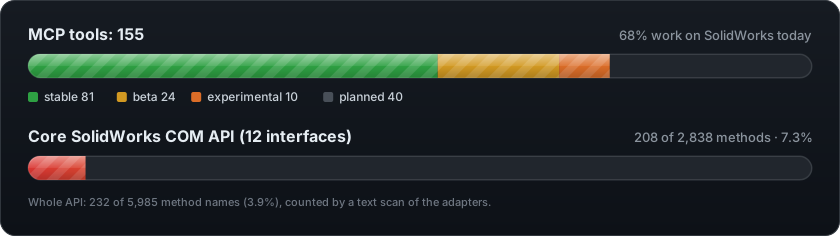
How far to trust each tool, and how much of SolidWorks' COM API the project
reaches. Everything on this page is generated from the code by
python -m solidworks_mcp.progress.generate, and a test fails when it's out
of date, so it moves with every tool added or fixed.
Support levels
Every tool has one level. It's in the tool's tags (level:beta). A beta or
experimental tool's description opens with it, and its successful results
carry it as warning.
| Level | Meaning |
|---|---|
| stable | Checked by a live test on real SolidWorks; every input used; no known fault. |
| beta | Works on SolidWorks, but has a known fault or covers only part of its COM call. The reason is shown with it. |
| experimental | Implemented, but not yet checked on real SolidWorks. |
| planned | Registered, but nothing implements it yet; every call returns not_supported. |
A fixed fault, or a new live test, moves a tool up a level: the table is
src/solidworks_mcp/tools/support_levels.py.
Every tool
| Tool | Family | Level | What it does |
|---|---|---|---|
activate_document | file_management | stable | Make an already-open document the active one, so the next tools act on it. |
add_annotation | drawing | planned no adapter implements it yet. | Add an annotation (a note, balloon or surface-finish symbol) to the active drawing. |
add_arc | sketching | stable | Draw a circular arc in the open sketch from its centre, start point and end point, in mm. |
add_centerline | sketching | stable | Draw a centreline (construction line) in the open sketch, in mm. |
add_chamfer | modeling | stable | Bevel edges of the active part with an equal-distance chamfer at 45 degrees. |
add_circle | sketching | stable | Draw a circle in the open sketch from its centre and radius, in mm. |
add_datum_tag | drawing_automation | stable | Add a datum feature symbol (A, B, C, ...) on an edge of the active drawing. |
add_dimension | drawing | planned no adapter implements it yet. | Add one dimension between drawing entities at a position on the sheet. |
add_drawing_view | drawing | beta only ever adds a view, whatever `operation` says; use `create_drawing_view`. | Place one named view of a part or assembly on the active drawing sheet; the same as `create_drawing_view`. |
add_ellipse | sketching | stable | Draw an ellipse in the open sketch from its centre and axis lengths, in mm. |
add_fillet | modeling | stable | Round edges of the active part with a constant-radius fillet. |
add_gtol | drawing_automation | stable | Add a GD&T feature control frame to the active drawing, e.g. position Ø0.2 (M) to A|B|C. |
add_line | sketching | stable | Draw a straight line between two points in the open sketch, in mm. |
add_mate | modeling | beta mates only reference planes and axes, by name, not faces. | Mate two components of the active assembly: coincident, concentric, parallel, perpendicular, tangent, distance or angle. |
add_note | drawing | stable | Place a text note on the active drawing sheet at a position in millimetres. |
add_polygon | sketching | stable | Draw a regular polygon (e.g. a hexagon) in the open sketch from its centre, radius and number of sides. |
add_rectangle | sketching | stable | Draw a closed, axis-aligned rectangle in the open sketch from two opposite corners, in mm. |
add_sketch_constraint | sketching | stable | Add a geometric relation between sketch entities: horizontal, vertical, parallel, perpendicular, tangent, coincident, concentric, equal, symmetric, collinear or fix. |
add_sketch_dimension | sketching | stable | Add a driving dimension to sketch entities: linear, angular, radial or diameter. |
add_spline | sketching | stable | Draw a smooth spline through a list of points in the open sketch, in mm. |
analyze_drawing_annotations | drawing_analysis | planned no adapter implements it yet. | Check a drawing's notes, symbols and text styles for consistency. |
analyze_drawing_comprehensive | drawing_analysis | planned no adapter implements it yet. | Run every drawing check (dimensions, views, annotations, standards) on a drawing file in one call. |
analyze_drawing_dimensions | drawing_analysis | planned no adapter implements it yet. | Check a drawing's dimensions for consistent precision, tolerance formatting and completeness. |
analyze_drawing_views | drawing_analysis | planned no adapter implements it yet. | Check how a drawing's views are chosen and laid out. |
analyze_geometry | analysis | planned no adapter implements it yet. | Run a geometry analysis on the active model, such as curvature, draft or wall thickness. |
analyze_macro | macro_recording | planned no adapter implements it yet. | Analyse a macro's structure, dependencies and complexity, and suggest optimisations. |
apply_template | template_management | planned no adapter implements it yet. | Apply a saved template's properties, dimensions and materials to a model. |
arrange_dimensions | drawing_automation | stable | Move drawing dimensions out of their views into tidy rows so nothing overlaps, then check the sheet. |
auto_center_marks | drawing | stable | Insert centre marks on the holes, slots and (optionally) fillets of one drawing view. |
auto_dimension_view | drawing | planned no adapter implements it yet. | Dimension a drawing view automatically with SolidWorks' auto-dimension scheme. |
automation_start_macro_recording | automation | planned no adapter implements it yet. | Start SolidWorks' macro recorder (the automation family's copy of `start_macro_recording`). |
automation_stop_macro_recording | automation | planned no adapter implements it yet. | Stop a macro recording and save it (the automation family's copy of `stop_macro_recording`). |
batch_apply_template | template_management | planned no adapter implements it yet. | Apply one template to every matching model in a folder. |
batch_execute_macros | macro_recording | planned no adapter implements it yet. | Run several macros in sequence against the files in a folder. |
batch_export | export | planned no adapter implements it yet. | Export every matching SolidWorks file in a folder to one format. |
batch_file_operations | file_management | planned no adapter implements it yet. | Copy, move, rename or delete SolidWorks files on disk in one call. |
batch_process_files | automation | planned no adapter implements it yet. | Run one operation (rebuild, save as, export or property update) on every matching file in a folder. |
calculate_mass_properties | analysis | beta moments of inertia are labelled kg·mm² but are kg·m²; its input fields are unused. | Measure the active part or assembly's mass properties: volume, surface area, mass, centre of mass and moments of inertia. |
check_drawing_compliance | drawing_analysis | planned no adapter implements it yet. | Check a drawing's title block and sheet format against a drafting standard (ISO, ANSI or DIN). |
check_drawing_standards | drawing | planned no adapter implements it yet. | Check the active drawing against a drafting standard and score it. |
check_interference | analysis | beta `include_hidden` has no effect. | Find where the components of the active assembly overlap (Tools > Interference Detection). |
check_sketch_fully_defined | sketching | stable | Check whether a sketch is fully defined, under-defined or over-defined. |
classify_feature_tree | file_management | experimental not yet checked by a live test on real SolidWorks. | Classify the active model's kind (part, sheet metal, assembly, drawing and so on) from its feature tree, and suggest how to work on it. |
close_model | modeling | stable | Close the active document, saving it first only if asked. |
compare_drawing_versions | drawing_analysis | experimental not yet checked by a live test on real SolidWorks. | Compare two drawing files on disk: whether they are byte-identical, and how their sizes differ. |
compare_templates | template_management | experimental not yet checked by a live test on real SolidWorks. | Compare two template files on disk: whether they are byte-identical, and how their sizes differ. |
convert_file_format | file_management | planned no adapter implements it yet. | Convert a SolidWorks file on disk to another format without opening it first. |
create_assembly | modeling | beta `components` is ignored; use `insert_component`. | Create a new, empty assembly document and make it active, ready for `insert_component`. |
create_axis | modeling | stable | Add a reference axis along the model's x, y or z direction, through the origin. |
create_cut_extrude | modeling | stable | Cut material from the active part with a closed sketch profile: holes, slots, windows. |
create_detail_view | drawing | planned no adapter implements it yet. | Magnify a circular area of a drawing view as a detail view. |
create_drawing | modeling | beta `model_path` and `sheet_format` are ignored. | Create a new, empty drawing document and make it active. |
create_drawing_view | drawing | stable | Place one named view of a part or assembly on the active drawing sheet. |
create_extrusion | modeling | beta `sketch_name` and `direction` are ignored; it extrudes the sketch closed last. | Extrude the sketch you just closed into a solid boss, added to the active part. |
create_loft | modeling | stable | Loft a solid through two or more closed profile sketches, in order (Insert > Boss/Base > Loft). |
create_macro_library | macro_recording | planned no adapter implements it yet. | Set up a shared folder of categorised, documented macros. |
create_part | modeling | beta `material` is ignored; use `set_material`. | Create a new, empty part document and make it active, ready for `create_sketch`. |
create_reference_plane | modeling | stable | Add a reference plane parallel to a plane or flat face, offset by a distance in mm. |
create_reference_point | modeling | stable | Add a reference point on an edge (at a distance or percentage along it) or at the centre of a face. |
create_revolve | modeling | beta `sketch_name` and `axis_entity` are ignored; it revolves the sketch closed last around its centreline. | Revolve the sketch you just closed around the centreline drawn in it, adding a solid to the active part. |
create_section_view | drawing | planned no adapter implements it yet. | Cut a section view along a line across a drawing view. |
create_sketch | sketching | beta echoes a `sketch_name` you pass instead of SolidWorks' own name. | Open a new sketch on a plane of the active part, ready for lines, circles and other sketch entities. |
create_sweep | modeling | stable | Sweep a closed profile sketch along a path sketch to make a solid (Insert > Boss/Base > Sweep). |
create_technical_drawing | drawing | beta ignores `template`, `sheet_size`, `title` and `output_path`; it only places three views. | Place a model's three standard views (front, top and side) on the active drawing sheet in one call. |
create_template | automation | planned no adapter implements it yet. | Create a part, assembly or drawing template file (.prtdot, .asmdot, .drwdot) with standard settings. |
delete_feature | modeling | beta on SolidWorks its message doesn't name the dependent features it removed. | Delete a feature or sketch from the active model, along with the features that depend on it. |
discover_solidworks_docs | docs_discovery | stable | Rebuild the SolidWorks API index on purpose. The lookups don't need it. |
execute_macro | macro_recording | beta runs the macro once whatever `repeat_count` says, and only binary .swp files. | Run a binary SolidWorks macro (.swp, or legacy .swb) in the running SolidWorks, calling its `main` procedure once. |
execute_workflow | automation | planned no adapter implements it yet. | Run a named sequence of tool steps, in order or in parallel, with an error policy. |
exit_sketch | sketching | stable | Close the open sketch so a feature can use it. |
export_dwg | export | beta the file extension sets the format; `format_type` and `options` are ignored. | Export the active document to DWG, like File > Save As with the DWG type. |
export_flat_pattern | engineering_data | stable | Export the active sheet-metal part's flat pattern to DXF or DWG, for laser or waterjet cutting. |
export_iges | export | beta the file extension sets the format; `format_type` and `options` are ignored. | Export the active document to IGES, like File > Save As with the IGES type. |
export_image | export | stable | Save a picture of the active model in a standard view, as PNG or JPG, at a chosen size. |
export_pdf | export | beta the file extension sets the format; `format_type` and `options` are ignored. | Export the active document to PDF, like File > Save As with the PDF type. |
export_step | export | beta the file extension sets the format; `format_type` and `options` are ignored. | Export the active document to STEP, like File > Save As with the STEP type. |
export_stl | export | beta the file extension sets the format; `format_type` and `options` are ignored. | Export the active document to STL, like File > Save As with the STL type. |
extract_template | template_management | planned no adapter implements it yet. | Capture a model's settings (custom properties, dimensions, units) as a reusable template file. |
find_related_api_members | docs_discovery | stable | Find SolidWorks API members related to an interface or member name. |
generate_drawing_package | drawing_automation | stable | Create a complete A3 drawing of a part or assembly in one call, and save it with a PDF. |
generate_drawing_report | drawing_analysis | planned no adapter implements it yet. | Write a quality report that combines every drawing check. |
generate_vba_assembly_insert | vba_generation | stable | Write a VBA macro that inserts a component into the active assembly at a point. |
generate_vba_assembly_mates | vba_generation | stable | Write a VBA macro that adds a concentric, distance, parallel, perpendicular or coincident mate between two selected faces or edges. |
generate_vba_batch_export | vba_generation | stable | Write a VBA macro that opens every matching file in a folder and saves a STEP copy of each to another folder. |
generate_vba_code | automation | experimental not yet checked by a live test on real SolidWorks. | Write a VBA macro skeleton for an operation you describe: the SolidWorks connection, the active document and optional error handling, with the operation itself left as a TODO. |
generate_vba_drawing_dimensions | vba_generation | stable | Write a VBA macro that adds a dimension to the selected drawing entities and sets its precision. |
generate_vba_drawing_views | vba_generation | stable | Write a VBA macro that places a model's standard views (front, top, right) on the active drawing. |
generate_vba_extrusion | vba_generation | stable | Write a VBA macro that makes an extrusion with the full FeatureExtrusion options: both directions, draft, thin wall, end conditions. |
generate_vba_file_operations | vba_generation | stable | Write a VBA macro that sets a custom property in every configuration, or runs Pack and Go on the active document. |
generate_vba_macro_recorder | vba_generation | stable | Write a VBA starting point: a macro skeleton to fill in, or a note on starting and stopping SolidWorks' macro recorder. |
generate_vba_part_modeling | vba_generation | stable | Write a VBA macro for a shell or a fillet on the active part. |
generate_vba_revolve | vba_generation | stable | Write a VBA macro that revolves the selected sketch, with both-direction and thin-wall options. |
get_custom_properties | engineering_data | stable | Read the active document's custom properties, such as PartNo, Description or Revision. |
get_dimension | modeling | experimental not yet checked by a live test on real SolidWorks. | Read one dimension of the active model by its full name, e.g. "D1@Sketch1". |
get_file_properties | file_management | experimental not yet checked by a live test on real SolidWorks. | Report the active document's file details: name, path, size, dates, type, configuration and unsaved changes. |
get_mass_properties | analysis | stable | Measure the active part or assembly's mass properties: volume, surface area, mass, centre of mass and moments of inertia. |
get_material | engineering_data | beta reads the material's name and library, not its properties. | Report the material assigned to the active part. |
get_material_properties | analysis | planned no adapter implements it yet. | Report the physical properties of the active part's material: density, modulus, Poisson's ratio, strength. |
get_model_info | file_management | stable | Report the active document's title, path, type, active configuration, unsaved changes, feature count and rebuild status. |
get_selected_entities | file_management | stable | Describe the faces, edges and vertices selected in the SolidWorks window right now. |
insert_bom_table | drawing_automation | stable | Insert a bill-of-materials table for an assembly view on the active drawing. |
insert_component | modeling | stable | Insert a part or sub-assembly file into the active assembly at a position in mm. |
insert_model_dimensions | drawing_automation | stable | Bring the model's dimensions into the active drawing's views, each dimension shown once. |
list_available_materials | engineering_data | stable | List the materials in the installed SolidWorks material libraries. |
list_components | modeling | stable | List the top-level components of the active assembly by instance name, e.g. "bracket-1". |
list_configurations | file_management | experimental not yet checked by a live test on real SolidWorks. | List the names of the active model's configurations. |
list_drawing_views | drawing | stable | List the views on the active drawing, by name. |
list_features | file_management | stable | List the feature tree of the active part or assembly, in order. |
list_model_dimensions | engineering_data | stable | List every dimension in the active part or assembly with its full name and value. |
list_open_documents | file_management | stable | List every document open in SolidWorks and say which one is active. |
list_template_library | template_management | planned no adapter implements it yet. | List the templates in the shared template library. |
load_assembly | file_management | experimental not yet checked by a live test on real SolidWorks. | Open an assembly (.sldasm) from disk and make it the active document. |
load_part | file_management | experimental not yet checked by a live test on real SolidWorks. | Open a part (.sldprt) from disk and make it the active document. |
lookup_api_interface | docs_discovery | stable | List every method and property of a SolidWorks COM interface. |
lookup_api_method | docs_discovery | stable | Look up one SolidWorks API method or property: parameters, return type, description. |
manage_design_table | automation | planned no adapter implements it yet. | Create, read or update a design table (an Excel sheet that drives a model's configurations). |
manage_file_properties | file_management | planned no adapter implements it yet. | Read or change the file-level properties of a SolidWorks file on disk. |
measure_entities | engineering_data | stable | Measure faces, edges or vertices of the active model with SolidWorks' Measure tool. |
mirror_feature | modeling | beta mirroring a cut is reported as an error. | Mirror solid bodies or features of the active part about a plane. |
open_model | modeling | stable | Open a part, assembly or drawing from disk and make it the active document. |
optimize_macro | macro_recording | planned no adapter implements it yet. | Suggest improvements to a macro's code for speed and reliability. |
optimize_performance | automation | planned no adapter implements it yet. | Review SolidWorks' performance settings and apply faster ones. |
pack_and_go_assembly | file_management | experimental not yet checked by a live test on real SolidWorks. | Copy an assembly and every part it references into one folder, with the references updated (SolidWorks Pack and Go). |
pattern_circular | modeling | beta patterning a cut is reported as an error. | Repeat features of the active part around an axis, e.g. a ring of bosses or ribs. |
rebuild_model | modeling | stable | Rebuild the active model and report each feature that fails, with the reason and a fix. |
rename_feature | modeling | stable | Rename a feature in the active model's feature tree. |
reset_circuit_breaker | server_admin | stable | Let calls through again to operations the server paused after repeated failures. |
save_as | file_management | beta replaces an existing file whatever `overwrite` says. | Save the active document under a new path, as a SolidWorks file or in an exchange format such as STEP or IGES. |
save_assembly | file_management | stable | Save the active assembly in place, or as a new .sldasm, optionally copying the parts it uses alongside. |
save_body_as_part | file_management | stable | Save one solid body of the active multibody part as a new part file (Insert > Features > Save Bodies). |
save_file | file_management | beta `force_save` is ignored. | Save the active document, to its own path or to a new path in its own format. |
save_part | file_management | stable | Save the active part in place, or as a new .sldprt with the target path checked first. |
save_to_template_library | template_management | planned no adapter implements it yet. | Add a template to a shared, categorised template library. |
search_solidworks_api_help | docs_discovery | stable | Search SolidWorks API interface and member names by keyword. |
select_face_edges | modeling | stable | Select every edge of one face of the active part, ready for `add_fillet` or `add_chamfer` with no edge names. |
select_feature | modeling | stable | Select a feature, sketch, plane or component by name in the active document. |
set_custom_property | engineering_data | stable | Create or overwrite one text custom property on the active document, e.g. PartNo or DrawnBy. |
set_dimension | modeling | stable | Change one length dimension of the active model, in mm, and rebuild. |
set_material | engineering_data | stable | Assign a library material to the active part, e.g. "AISI 1020" or "6061-T6 (SS)". |
set_sheet_scale | drawing_automation | stable | Set the active drawing sheet's scale, e.g. 1:2; views that use the sheet scale follow it. |
set_units | modeling | stable | Set the active document's length units: mm, cm, m, in or ft. |
sketch_circular_pattern | sketching | stable | Repeat sketch entities around the sketch origin, e.g. a bolt circle. |
sketch_linear_pattern | sketching | stable | Repeat sketch entities in a straight line at a fixed spacing. |
sketch_mirror | sketching | stable | Mirror sketch entities about a centreline in the open sketch. |
sketch_offset | sketching | stable | Offset sketch entities by a distance in mm, outward or inward, e.g. for a wall or a clearance. |
sketch_tutorial_simple_hole | sketching | beta suggests a negative-depth extrusion for the hole instead of `create_cut_extrude`. | Demonstrate the sketch steps: draw a 5 mm circle at the origin on the Top plane and close the sketch. |
start_macro_recording | macro_recording | planned no adapter implements it yet. | Start SolidWorks' macro recorder, to capture what the user does as a macro. |
stop_macro_recording | macro_recording | planned no adapter implements it yet. | Stop the macro recorder and save the recorded macro. |
suppress_feature | modeling | stable | Suppress or unsuppress a feature of the active model; suppressed features stay in the tree but are not built. |
tutorial_simple_hole | sketching | planned no adapter implements it yet. | Draw a circle on a plane and cut it as a hole, as one worked example. |
undo | modeling | stable | Undo the last operations in the active model (Edit > Undo). |
update_sheet_format | drawing | planned no adapter implements it yet. | Change the active drawing's sheet format file and title-block fields. |
update_title_block | drawing | planned no adapter implements it yet. | Fill in the active drawing's title-block fields (title, drawn by, drawing number and so on). |
validate_drawing_completeness | drawing_analysis | planned no adapter implements it yet. | Check that a drawing carries everything needed to manufacture the part. |
verify_model | analysis | stable | Check the active part or assembly against what you meant to build, one pass/fail check per expected value. |
| Interface | Methods called | Of | Called |
|---|---|---|---|
ISldWorks | 22 | 330 | 6.7%ActivateDoc3, CloseAllDocuments, CloseDoc, Frame, GetConfigurationNames, GetCurrentLanguage, GetDocuments, GetExecutablePath, GetExportFileData, GetMassProperties, GetOpenDocumentByName, GetUserPreferenceStringValue, GetUserPreferenceToggle, NewAssembly, NewDocument, NewDrawing2, NewPart, OpenDoc6, RevisionNumber, RunMacro2, SetUserPreferenceIntegerValue, SetUserPreferenceToggle |
IModelDoc2 | 66 | 758 | 8.7%AddDiameterDimension2, AddDimension, AddDimension2, AddRadialDimension2, AddRelation, ClearSelection2, CreateArc, CreateCenterLine, CreateCircleByRadius, CreateCircularSketchStepAndRepeat, CreateEllipse, CreateLine, CreateLinearSketchStepAndRepeat, EditDelete, EditRebuild3, EditSuppress2, EditUndo, EditUndo2, EditUnsuppress2, FeatureByPositionReverse, FeatureChamferType, FeatureCut3, FeatureCut4, FeatureFillet3, FeatureRevolve2, FirstFeature, ForceRebuild3, GetActiveConfiguration, GetActiveSketch2, GetConfigurationNames, GetFeatureCount, GetLineCount, GetMassProperties, GetNext, GetPathName, GetSaveFlag, GetTitle, GetType, GetUserPreferenceStringValue, GetUserPreferenceToggle, GraphicsRedraw2, InsertAxis2, InsertDatumTag2, InsertGtol, InsertNote, InsertProtrusionBlend2, InsertProtrusionSwept4, InsertSketch, Lock, Parameter, Save, Save3, SaveAs, SaveAs2, SaveAs3, SaveBMP, Select, SetSaveFlag, SetUserPreferenceIntegerValue, SetUserPreferenceToggle, ShowNamedView2, SketchAddConstraints, SketchMirror, SketchOffset2, ViewZoomtofit, ViewZoomtofit2 |
IModelDocExtension | 20 | 337 | 5.9%AddDimension, CreateMassProperty, CreateMeasure, CustomPropertyManager, DeleteSelection2, GetAnnotations, GetMassProperties, GetPackAndGo, GetUserPreferenceInteger, GetUserPreferenceToggle, GetWhatsWrong, GetWhatsWrongCount, InsertBomTable4, SaveAs, SaveAs2, SaveAs3, SavePackAndGo, SelectByID2, SetUserPreferenceInteger, SetUserPreferenceToggle |
IPartDoc | 12 | 167 | 7.2%ExportToDWG2, FeatureByName, FeatureExtrusion2, FeatureExtrusion3, FeatureExtrusionThin2, FeatureRevolve2, FirstFeature, GetBodies2, GetMaterialPropertyName2, GetPartBox, InsertMirrorFeature, SetMaterialPropertyName2 |
IAssemblyDoc | 8 | 198 | 4.0%AddComponent4, AddComponent5, AddMate5, FeatureByName, GetBox, GetComponentByName, GetComponentCount, GetComponents |
IDrawingDoc | 13 | 272 | 4.8%ActivateView, AutoDimension, Create1stAngleViews2, Create3rdAngleViews2, CreateDrawViewFromModelView3, EditSheet, EditTemplate, FeatureByName, GetCurrentSheet, GetFirstView, GetViews, InsertModelAnnotations3, SetupSheet5 |
IFeatureManager | 16 | 268 | 6.0%CreateSaveBodyFeature, FeatureCircularPattern5, FeatureCut3, FeatureCut4, FeatureExtrusion2, FeatureExtrusion3, FeatureExtrusionThin2, FeatureFillet3, FeatureRevolve2, GetFeatureCount, InsertFeatureChamfer, InsertMirrorFeature, InsertProtrusionBlend2, InsertProtrusionSwept4, InsertRefPlane, InsertReferencePoint |
ISketchManager | 12 | 83 | 14.5%CreateArc, CreateCenterLine, CreateCircleByRadius, CreateCircularSketchStepAndRepeat, CreateCornerRectangle, CreateEllipse, CreateLine, CreateLinearSketchStepAndRepeat, CreatePolygon, CreateSpline2, InsertSketch, SketchOffset2 |
ISelectionMgr | 4 | 61 | 6.6%CreateSelectData, GetSelectedObject6, GetSelectedObjectCount2, GetSelectedObjectType3 |
IComponent2 | 14 | 147 | 9.5%CustomPropertyManager, FeatureByName, FirstFeature, GetBodies2, GetBox, GetConfigurationNames, GetID, GetModelDoc2, GetPathName, GetType, IsSuppressed, Select, Select2, Select4 |
IFeature | 18 | 115 | 15.7%GetBox, GetErrorCode2, GetFaces, GetFirstDisplayDimension, GetFirstSubFeature, GetID, GetNameForSelection, GetNextDisplayDimension, GetNextFeature, GetNextSubFeature, GetParents, GetSpecificFeature2, GetTypeName2, IsSuppressed, IsSuppressed2, Parameter, Select, Select2 |
ISketch | 3 | 102 | 2.9%AutoDimension, GetLineCount, GetSketchSegments |
How COM coverage is counted
The core bar counts the methods of twelve interfaces most work goes through
(the application, documents, parts, assemblies, drawings, the feature and
sketch managers, selection, components, features and sketches). The table
under the tools lists them. A method counts as reached when the adapter source names it,
as an attribute (model.ForceRebuild3) or a string. The method names come
from a committed snapshot of the SolidWorks type library
(docs/assets/progress/com_snapshot.json, refreshed with
python -m solidworks_mcp.progress.snapshot after a SolidWorks upgrade).
A text scan can't tell IFeature.Name from IComponent2.Name, so the
figures are approximate. The whole-API figure is small because most of the
API's 5,985 method names serve features this project doesn't cover yet
(simulation, routing, PDM and so on).